Blog
The Band Calendar Problem: Why Normal Calendars Are Not Enough for Gigs
Learn when a shared band calendar is enough, where it breaks, and how to manage gig status, lineups, availability, and changes without duplicating work.
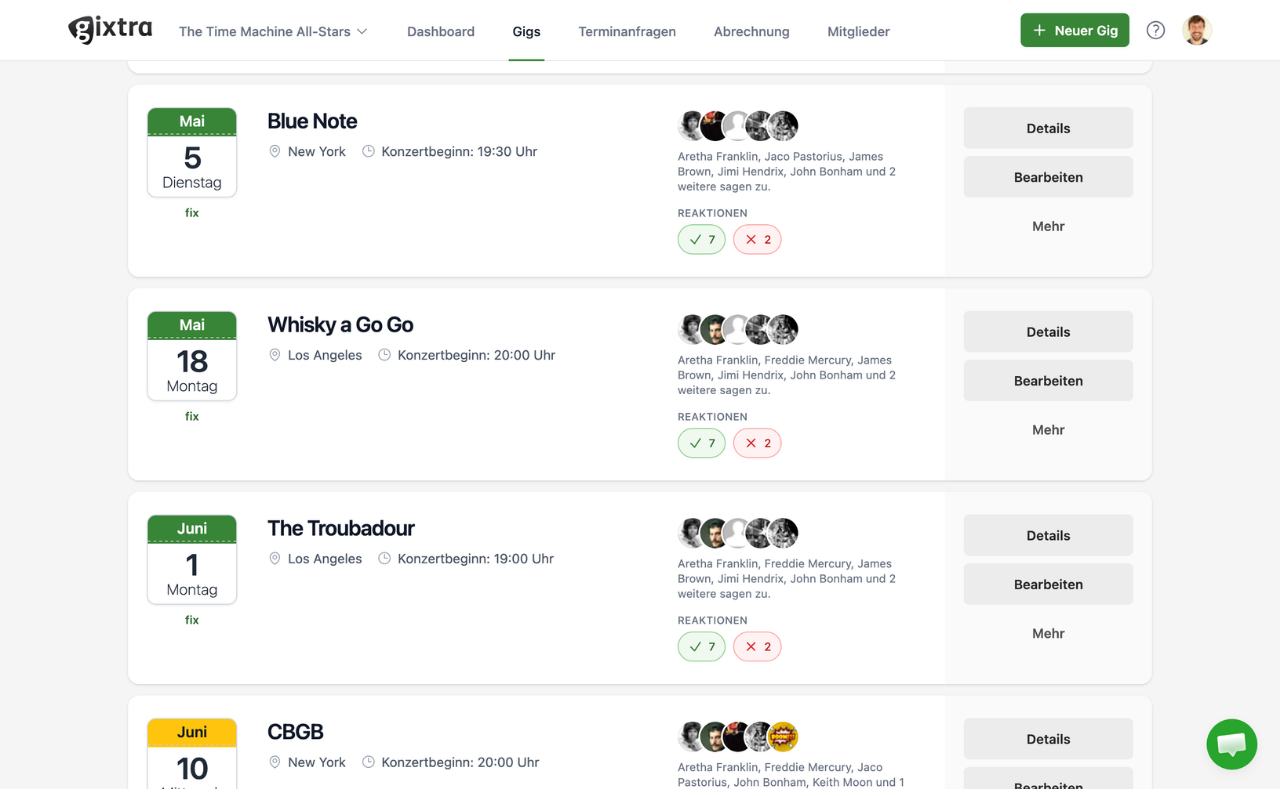
A shared band calendar is enough when the lineup is stable, the number of gigs is low, and one person keeps every entry current.
It starts to break when the band must manage options, different lineups, individual replies, private conflicts, and changing gig details. The calendar still has a job, but it should be the view of the plan rather than the only source of truth.
What a regular calendar does well
Google Calendar can share events and expose only free/busy information. Apple Calendar and Outlook can subscribe to online calendars and receive provider-controlled updates.
These capabilities are documented by Google, Apple, and Microsoft.
Musicians should be able to see gigs in the calendar app they already use. Dates, times, locations, reminders, and a link to more information all belong there.
The problem is not that ordinary calendars are bad. It is that a calendar entry is a poor place to run the decisions behind a changing gig.
Where a shared band calendar starts to break
A band can force more information into event titles, colors, descriptions, and guest lists. That works until the conventions become unclear or the same fact is copied into several places.
| Band decision | Calendar workaround | What can go wrong |
|---|---|---|
| Is the date an inquiry, option, or confirmed gig? | Prefix the title or use colors | People interpret the labels differently |
| Which lineup is being checked? | Add guests or write names in notes | An invite is mistaken for a commitment |
| Who accepted, declined, or might be available? | Use replies, chat, or a spreadsheet | The latest answer is split across tools |
| Does a musician have a private conflict? | Ask everyone before each offer | Slow replies delay the answer to the client |
| Which schedule and address are current? | Edit every copied entry | Old details survive in chat or personal calendars |
| What should disappear after a cancellation? | Ask everyone to delete it | Stale dates continue to look occupied |
The warning sign is duplication. If a change must be posted in the shared calendar, copied into a chat, and corrected in a spreadsheet, the band has several competing versions of the gig.
Build the workflow before choosing another tool
You can improve a band calendar without replacing every app. Start by agreeing on one source of truth and a small set of states.
For example:
- Inquiry: The date is not held and no lineup has been promised.
- Availability check: Named musicians are being asked for a specific job.
- Option: The date is held until a clear deadline under agreed conditions.
- Confirmed: The required agreement or approval is complete.
- Cancelled or lost: The date should no longer appear as an active gig.
Document what each state means. A colored calendar entry is not enough if one musician reads “option” as “keep the evening free” and another reads it as “the gig is confirmed.”
Before asking for availability, record the minimum information a musician needs to answer:
- Date and realistic time window
- Venue or at least the location
- Event type and expected lineup
- Fee or agreed fee basis
- Reply deadline
- Option deadline, if one exists
Once the gig is confirmed, add the operational details: contacts, schedule, travel, hotel, dress code, production notes, documents, and the final lineup.
Keep replies beside that gig. If acceptance lives in chat while the lineup lives in a spreadsheet, the calendar cannot tell the booker whether the band is actually ready to confirm.
Use calendar sync in both directions
Most bands think about one direction: sending gig dates to each musician’s personal calendar. A stronger setup also checks private availability before a booker builds a lineup.
Send relevant gigs to each musician
In Gixtra, a personal calendar feed can show the gigs a musician has accepted or marked as maybe. Gigs they declined, no longer participate in, or that are no longer active do not remain in that feed.
The calendar entry contains basic information and links back to the full gig. Changes pass through the feed, but the calendar app decides when to refresh it, so an update may not appear immediately.
See how the personal Gixtra calendar feed works, including its plan availability and refresh limitation.
Bring private conflicts into the availability check
A musician can connect a private calendar to Gixtra with an iCal URL. Gixtra uses busy information to warn the booker about a possible conflict without showing the private appointment’s title or details.
A busy entry does not automatically reject the offer. It is a warning; the booker can still invite the musician, and the musician still makes the final decision.
See how private-calendar availability works or compare the two calendar directions.
A practical band-calendar checklist
Use this checklist to test your current setup:
- Every active gig has one authoritative record.
- Inquiry, option, confirmed, and cancelled have agreed meanings.
- The proposed lineup and each reply are visible together.
- Musicians receive only the calendar view relevant to them.
- Calendar entries link back to current gig details.
- Private conflicts can be flagged without exposing private details.
- One person owns changes, cancellations, and client communication.
- The band knows that subscribed calendar updates may be delayed.
If all eight are true, a shared calendar may already be enough. Do not add software merely to replace a process that works.
If the same dates are repeatedly copied between chat, spreadsheets, and calendars, the problem is no longer the calendar app. The band needs a clearer coordination layer.
What Gixtra adds to a personal calendar
Gixtra keeps the gig state, lineup, replies, and details together, then provides relevant calendar views and private-availability warnings. That reduces duplicate administration after an opportunity reaches the band.
If the real problem is an empty pipeline, start with our guide to booking more gigs as a band.
If gigs are arriving but coordination is slowing down reliable answers, see how Gixtra supports band leaders managing availability, lineups, options, and gig details.
Common questions
Do we have to stop using Google Calendar, Apple Calendar, or Outlook?
No. The point of a calendar feed is to let musicians keep using their preferred calendar app while the band manages the underlying gig in one place.
Can a booker see the details of a private appointment?
No. Gixtra uses busy information for a warning and does not show the private appointment’s details to the booker.
Does a private conflict automatically decline a gig?
No. The warning informs the availability check. The booker may still send an invitation, and the musician decides how to respond.
Why has a changed or cancelled gig not updated yet?
Calendar feeds are subscriptions. The receiving calendar app controls its refresh schedule, so changes are not always immediate.
When is a shared calendar enough for a band?
It may be enough for a fixed lineup with few dates, simple details, and a reliable owner. Add a coordination system when options, substitutes, private conflicts, or repeated changes create parallel records and slow decisions.
Keep the lineup and gig details together
Gixtra shows who is playing, what is still open, and which details apply to the gig.