Blog
Stop Searching WhatsApp for Gig Details: Use Gixtra Instead
For every show, the lineup, schedule, setlist, and backline must fit together. In Gixtra, everyone involved can see what currently applies to that engagement.
5:40 p.m. After a journey delayed by two and a half hours, a band has 20 minutes left for changeover and soundcheck. The backline and merch are out of the van and the setup is ready on the side stage. The show still starts at 6 p.m.
The musician recounting this real day on tour explains why: everybody pitches in, the setup is built for fast load-in and load-out, and the routine is well rehearsed. A band without tour management or backline crew could not absorb that schedule otherwise.
Anyone running a Top 40 band knows the same job: the lineup, schedule, setlist, arrangements, and backline must fit this particular show. One cover band with a repertoire of more than 200 songs and engagements ranging from tent parties to weddings therefore prepares a separate setlist for every show. Because deps are not unusual in Top 40, the setlist must also fit the actual lineup.
When the performance times change or somebody drops out, it is not enough for the new detail to exist somewhere. The people actually playing need the current version for that engagement.
That is where Gixtra helps: each gig connects the current lineup with timings, setlist, files, and production arrangements. The bandleader no longer has to reconstruct those details for each player before departure, leaving the band more room to handle the things nobody can plan.
Start with the basic details
An inquiry may contain only a date, town, and approximate time. That is enough to create the gig in Gixtra, ask the likely lineup, and make the missing details visible.
After confirmation, add what the musicians and crew need:
- exact address, access route, and on-site contact
- lineup and responsibilities
- arrival, load-in, soundcheck, doors, set times, and load-out
- travel, hotel, catering, and dress code where relevant
- setlist, charts, recordings, and notes about special songs
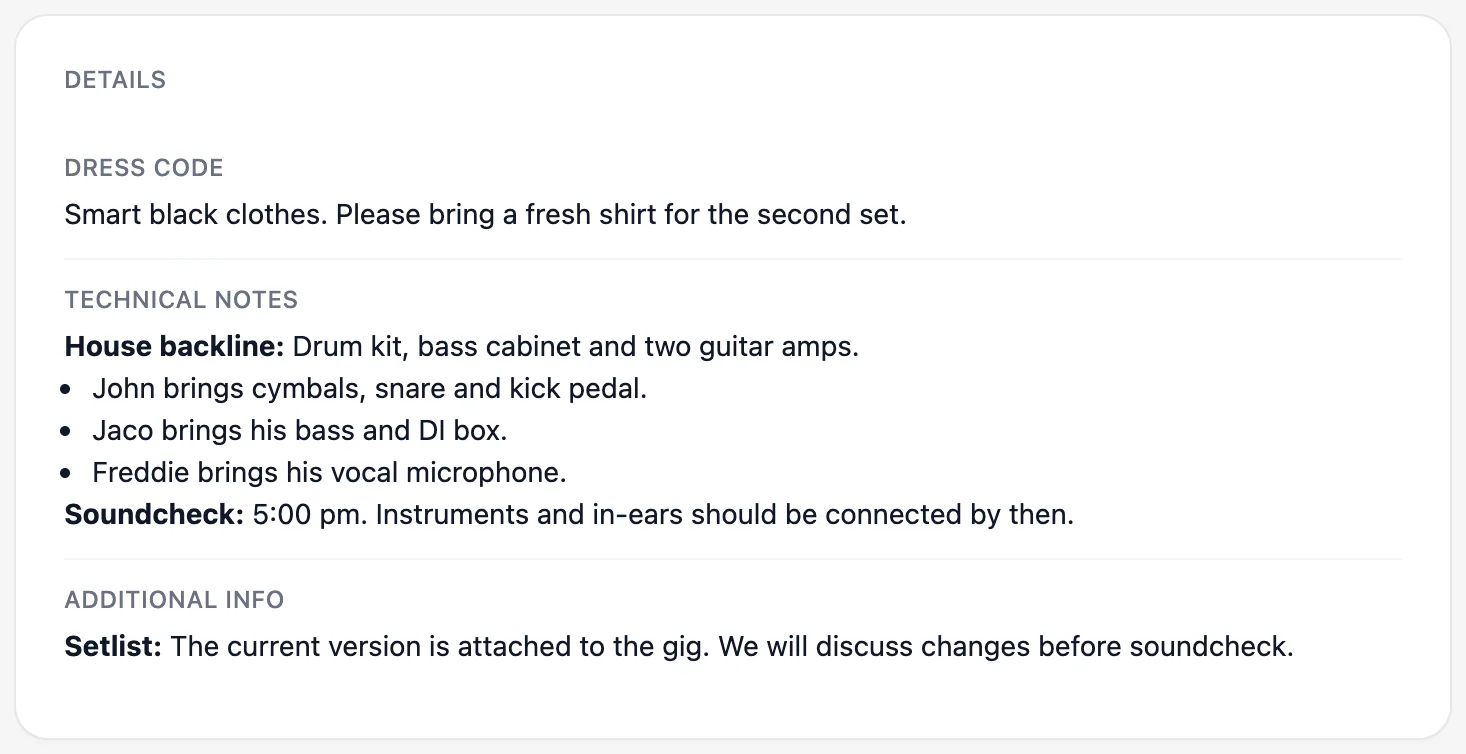
- tech spec, stage plot, and backline split
Not every show needs every item. An acoustic duo in a restaurant does not need a festival-sized production plan. It still needs to know where to enter, when to arrive, who will let them in, and what equipment is supplied.
The Musicians' Union recommends agreeing when the organizer will provide complete performance information. Its guidance for live engagements includes arrival, load-in and load-out, access, parking, shared gear, soundcheck, performance times, and doors. Treat that as a check for missing details, not a compulsory template for every act.
A venue address does not tell you how to get the gear inside
A postal address gets the van to the site, but not necessarily to the stage. A discussion about what information a band needs before a show therefore mentions access and parking alongside arrival, setup, soundcheck, catering, performance, teardown, and contacts.
Do not stop at the venue name. Add:
- the navigation address
- the actual vehicle entrance and gate
- parking or temporary unloading restrictions
- loading dock, stairs, or lift
- passes or access codes where required
- the name and mobile number of somebody available on show day
Attach the venue's access PDF if it has one, but also put the critical exception in visible text: “Do not use the main entrance; enter through Gate C on Harbour Street.” Nobody should need to open a PDF to discover that they are at the wrong gate.
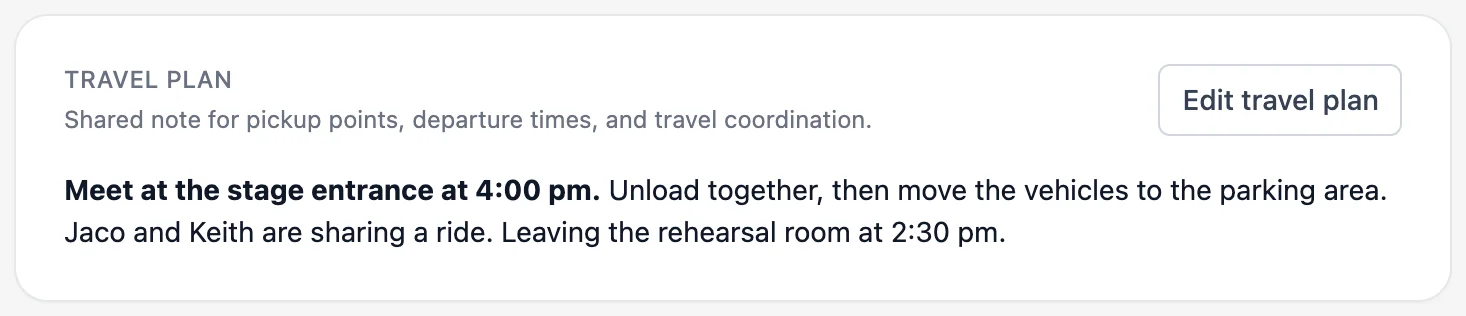
This demo gig goes beyond the address: everyone can see where to meet and who is sharing a ride.
Make the backline split specific
“Equipment provided” is not enough. List what the venue supplies and what each player brings. For example:
- Venue: drum shells, bass cabinet, and three monitor mixes
- Drummer: snare, cymbals, pedal, and stands
- Bassist: amplifier head and personal DI
- Singer: wireless system and spare batteries
For larger productions, attach a current tech spec, stage plot, and channel list. The Musicians' Union's practical guidance on tech specs and stage plots covers inputs, phantom power, microphone stands, mains power, monitors, in-ears, and access requirements. Check that the file matches this lineup and venue before every show.
A substitute needs more than the setlist
A dep does not only need the song titles; they need your versions. In one musicians' discussion, a substitute received a CD and the names of roughly 40 songs even though exact horn-section parts were expected. Another player prepared from the original recordings, then found that the band's arrangements had evolved over years. The discussion about information for substitutes points to written arrangements and exact parts as the practical answer.
Once a substitute accepts the Gixtra gig, make sure they can find:
- the current setlist in order
- your keys and versions
- charts or written parts
- useful rehearsal or live recordings
- medleys, transitions, starts, and endings that differ from the record
- dress, arrival, schedule, and their equipment responsibilities
A file called setlist-final-new-4.pdf does not make the current version obvious. Replace the old attachment or label the valid version clearly.
Send changes without making people guess
When notifications are enabled as you save a gig, Gixtra tells the affected participants what changed and links them back to the gig. You can disable the notification for a save that does not need an alert. See how notifications for gig changes work.
Update the gig first. Then state the old and new details in plain language:
Update for Saturday: load-in is 16:30, not 16:00. Use Gate C. This affects drivers and backline. Please reply with 👍 to confirm.
A notification does not prove that somebody read a critical update. Ask for acknowledgement when a missed change could send somebody to the wrong entrance or leave essential equipment behind. Call if time is short.
Check the gig before leaving
Open the gig and answer these questions:
- Am I playing, and who else is in the lineup?
- Which address and entrance apply?
- What is my first required time?
- Who can I call if nobody opens the venue?
- What must I bring?
- Which setlist, keys, and files are current?
- What changed after the initial confirmation?
- What is still unresolved, and who is checking it?
Gixtra keeps the results of those conversations together: the lineup, schedule, files, travel details, and production information stay attached to the same gig—not only in a message somebody sent at 23:14 on Tuesday.
If you coordinate changing lineups across several shows, the band-leader page shows how Gixtra supports the work from inquiry to gig.
Keep the lineup and gig details together
Gixtra shows who is playing, what is still open, and which details apply to the gig.