After a fixed gig has been played, you can prepare the amounts each musician should put on their invoice and follow the work through to payment.
This workflow is included from the Newcomer plan upward. You need the accountant or administrator role. If you handle both booking and accounting, make sure your band membership also includes one of these roles.
Start with the monthly overview
Open Clearing, then Fees & costs. Choose the month you want to work on.
The overview shows every gig in that month and answers the questions that matter before you open the details:
- Has the gig already been played?
- How many musicians have reported travel expenses?
- Is the accounting still a draft, released, or being corrected?
- How many musician invoices have arrived?
- How many invoices have been marked as paid?
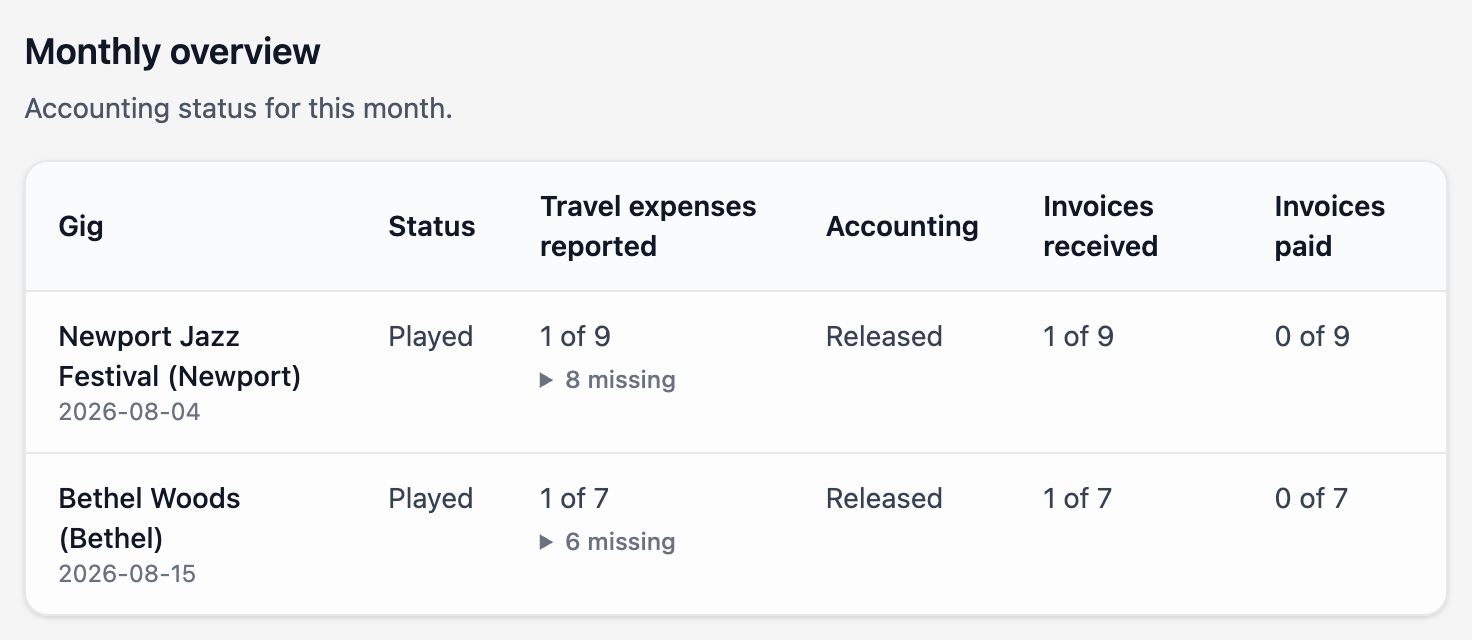
Both gigs in this example have been released. One musician invoice has arrived for each gig; none have been marked as paid yet.
Upcoming gigs stay visible for planning, but their accounting is marked Not due yet. Amounts can only be prepared after a fixed gig has been played.
If travel expenses are enabled, expand the missing count to see which musicians have not entered anything yet. This is a work list, not an error message.
You can also open a played gig and select its Accounting tab. Both places use the same saved amounts and release state. The regular gig page remains readable and only shows a summary when amounts have already been entered.
Check the travel-expense information
A musician's travel-expense entry can contain text such as 180 km + €5 parking. Gixtra shows that entry as a hint below the Travel expenses field. Use it to calculate the amount that should be suggested on the invoice.
The text is not copied into the amount field because it may contain distances, receipts, notes, or several kinds of cost.
Enter the suggested amounts
Each confirmed musician has a row with Fee and Travel expenses.
If that musician has an individual fee for the gig, Gixtra uses it as the starting value for Fee. Otherwise the field starts empty. The travel-expense amount also starts empty until you enter it.
Select Save on each row as you work. You can return and change saved values as often as needed before release. These intermediate saves remain private and do not notify musicians.
The values are suggestions for the musician's invoice, not locked amounts. When musicians create an invoice, released values are used as starting values. They can still change them before finalizing the invoice. If you leave a value empty, the corresponding invoice field starts empty.
Release the accounting
Once the calculation is ready, select Release accounting and confirm the action.
Gixtra then:
- stores that released version of the amounts;
- notifies every confirmed musician that they can create an invoice; and
- makes the suggestions available when each musician starts an invoice.
The notification tells musicians that the accounting is ready. It does not include anyone else's amounts or the accountant's calculations.
Released gigs are collapsed in Fees & costs and marked Released. This keeps finished work out of the way while leaving the details available when you need to look something up.
Track invoices and payments
Each musician's row shows the current invoice state:
- Not received yet
- Received with a link to the invoice
- Paid with a link to the invoice
- Correction required
- Corrected invoice pending
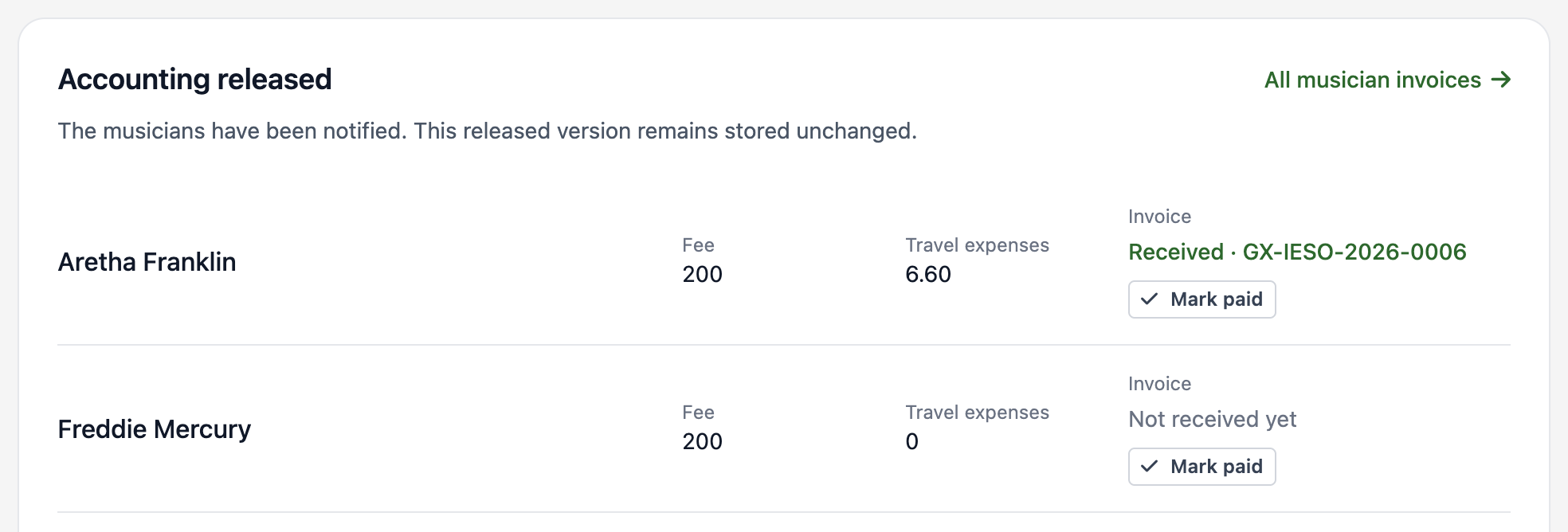
In this demo-band example, the green invoice number opens the received invoice. After paying it, you can mark it as paid here.
Use All musician invoices, or open Musician invoices under Clearing, to see the full list. There you can open or download the PDF and mark an invoice as paid.
Correct released accounting
If a released amount is wrong, expand the gig and select Prepare correction.
The correction is a new private draft. Musicians continue to see the last released version while you edit and save the corrected amounts. Gixtra shows how many people are affected before you select Send correction. Only musicians whose amounts changed are notified.
What happens next depends on the invoice state:
- No invoice yet: the new values become the starting suggestions when the musician creates one.
- Draft invoice: the musician's entries are not overwritten. The musician can review and apply the new suggestions.
- Finalized invoice: the invoice is marked as requiring correction. The musician can void it and create a replacement with a new invoice number. The voided invoice and its PDF remain available as a record.
- Paid invoice: Gixtra flags the correction, but the musician and accounting need to settle the difference directly.
Each release remains in the gig's accounting history, so a correction does not erase the version that was sent before it.
Who can see these amounts?
Only people with accountant or administrator rights can see the full prepared amounts, calculations, and invoice status across the band.
Musicians without accountant or administrator rights only receive their own released suggestions when working on their own invoice. They cannot see another musician's amount or the accountant's overview on the website, in the app, in notification emails, or in calendars.
This is separate from general fee information on a gig. A general fee may be visible to participants depending on the band's setup; with individual fees, each participant only sees their own fee.